
A practical win that shows just how far intelligent automation has come
Today I tested a workflow that ended up working far better than I expected --- not because it was flashy or theoretical, but because it solved real, annoying, everyday developer problems in Umbraco v17 using AI combined with the Umbraco MCP (Model Context Protocol).
Tasks that would normally eat up an entire afternoon were finished in minutes. No typos, no missed files, no repetitive "rename this → update that → copy this here" loops. Just clean, predictable automation.
It's the first time I've felt like AI is becoming a real part of the Umbraco workflow, not just a tool sitting on the side.
Why This Matters
As Umbraco evolves into the v14+ MCP world, our workflows are changing. We're no longer just "dragging things around in the backoffice." Backoffice definitions are now source-controlled files:
- Datatypes
- Document Types
- Languages
- Menus
- Sections
- Dashboards
- Trees
- Custom Properties
- Configuration schemas
And like any code-first system, this brings great power... and a lot of repetitive housekeeping.
That's where AI and MCP line up perfectly.
MCP gives AI a structured, code-friendly view of the Umbraco backoffice. AI (in this case, Cursor) handles massive pattern updates and reorganization at machine speed.
The combination is ridiculously effective.
Our Focus: ZAAKS! Team Exploring MCP for Better Automation
Our team at ZAAKS! https://www.zaaks.nl/ is heavily focused on using MCP to automate and improve Umbraco workflows. We’re using MCP to handle repetitive backoffice tasks so editors and developers can work faster and focus on the stuff that actually matters
What I Actually Automated
1. Updating Localization Keys Across the Entire Backoffice
This is one of those tasks that sounds small but becomes a nightmare when multiplied by 50--100 components.
Normally, when updating localization keys:
- You fix one key in
en.js - Then you update the corresponding key inside the DocumentType JSON
- Then you double-check alias naming
- Then you check the UI to ensure nothing breaks
- Then you notice one key was typed wrong
- Then you fix it again
- And repeat that lunch-eating loop 100 times
In Umbraco v17, where localization is structured and strongly typed, consistency is everything.

Image showing MCP updating localization keys in action.
Here's what i did
I created a pattern like:
Title → "#properties_title"
Description → "{#properties_title-desc}"
And instructed AI to:
- Parse all backoffice component definitions
- Identify every title + description property
- Rewrite them using the new localization key pattern
- Update
en.jswith the same keys - Ensure both sides stay synchronized
- Preserve references and aliases
- Leave untouched any custom fields
This would normally take a few hours of scanning, copying, and double-checking. Cursor processed everything in under 5 minutes.
And the best part? Perfect consistency. No missed files. No mismatched keys. No accidental renames.
Just clean, predictable localization.
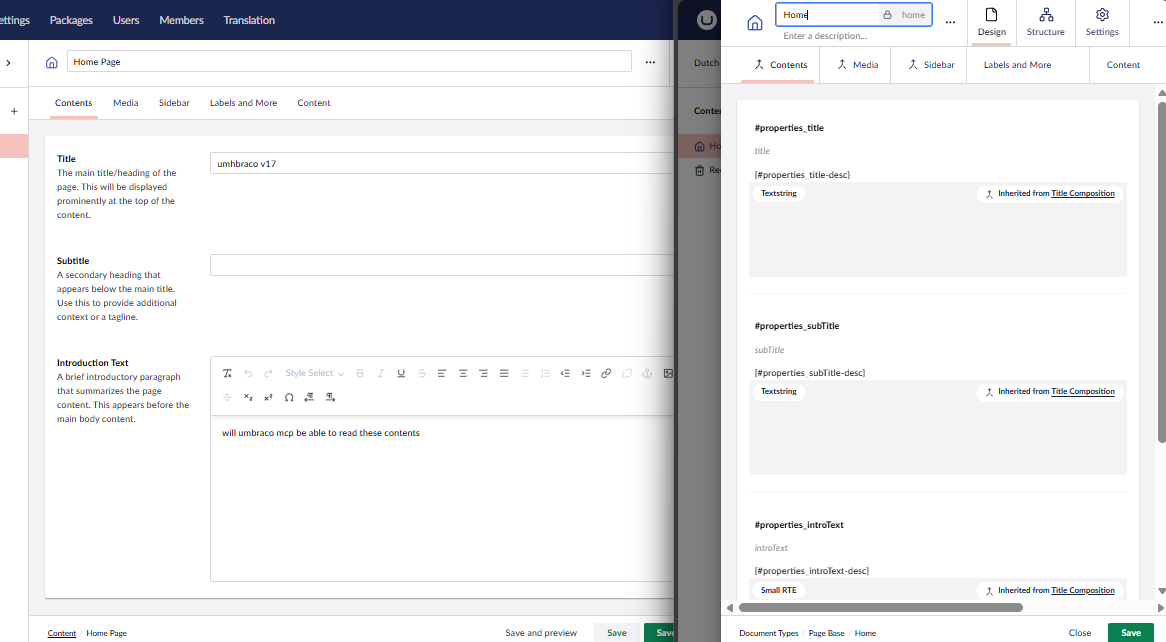
Backoffice after updating localization.
2. Reorganizing 50+ DataTypes Into Proper Folders
My DataTypes folder had turned into the classic "everything lives here but nobody knows why" situation.
A mix of:
- Block lists
- Pickers
- Media types
- Text fields
- Number fields
- Nested content
- Grid structures
- Old definitions
- New definitions
- Random experiments I forgot to delete
MCP stores each DataType as a JSON definition. But Umbraco doesn't enforce any native structure for DataType files --- so if you don't organize them early, it becomes a mess.
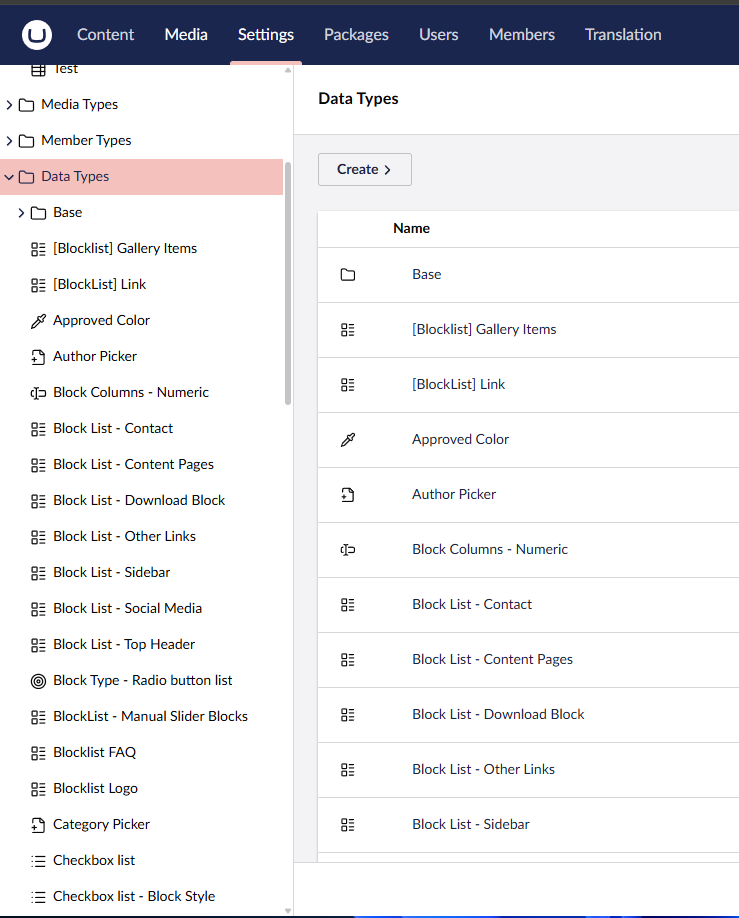
Before (unorganized datatypes)
Here's what i did
I instructed AI to:
- Scan all DataType JSON files
- Identify their underlying editor (e.g., "Umbraco.BlockList", "Umbraco.MediaPicker3")
- Create a clean folder structure:
BlockListsPickersTextMediaNestedContentGrid
- Move each DataType into its correct folder
- Preserve:
- aliases
- GUIDs
- configurations
- references
Manually, this is a two-hour job filled with micro-decisions.
AI did it in ~3 minutes. Everything landed in the right place. Nothing broke.
My DataTypes folder finally looks like something I'd be proud to hand to another developer.
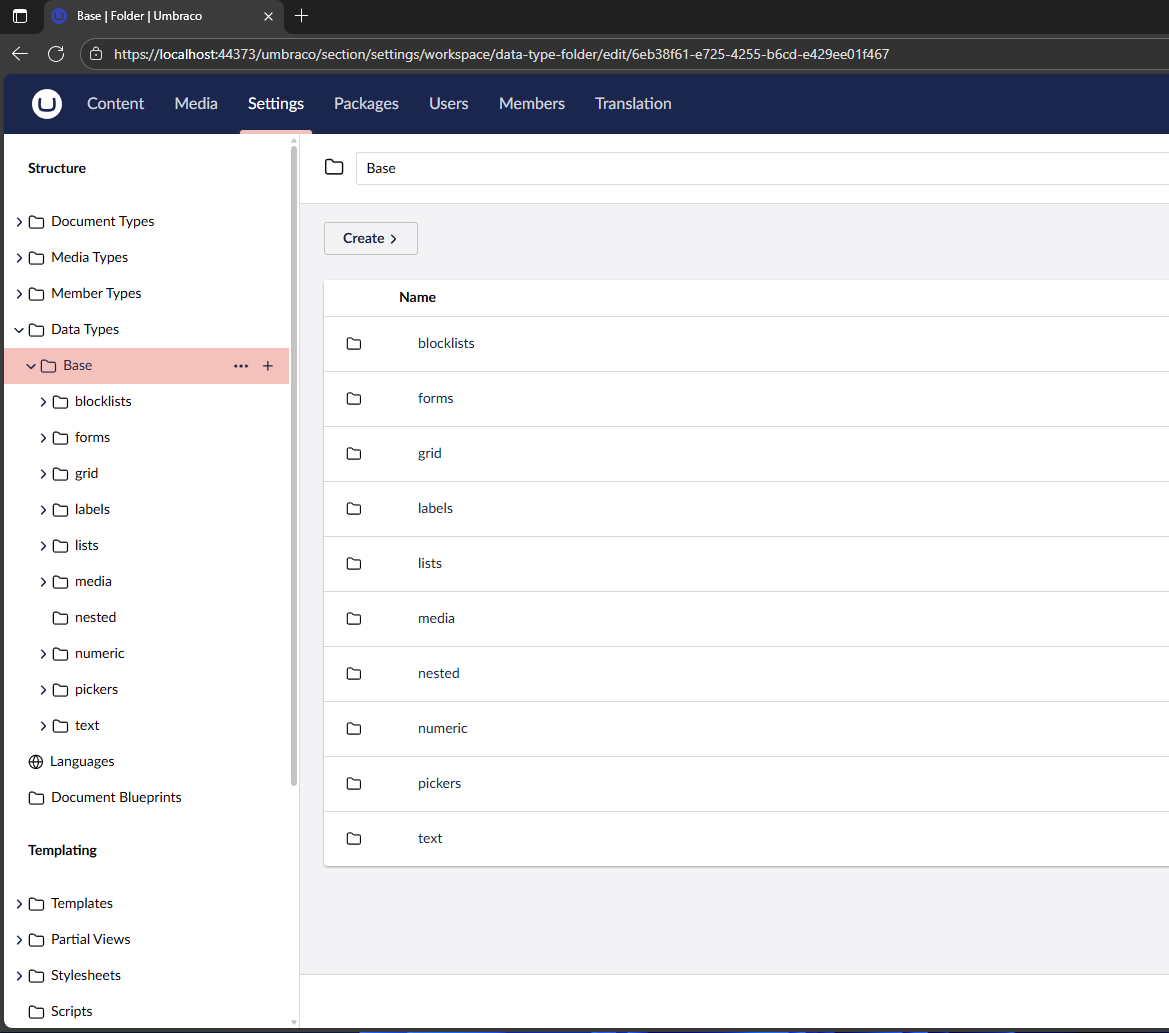
After (unorganized datatypes)
The Real Power of MCP + AI
(This is the part that most developers still underestimate)
MCP isn't "just another API." It represents a new way of interacting with Umbraco --- one that is:
- structured,
- predictable,
- code-first,
- and ideal for automation.
Here's why MCP and AI work so well together:
✔ MCP uses schemas
Every backoffice element has a strong JSON structure. AI can read, understand, and transform these safely.
✔ MCP removes guesswork
No more trying to reverse-map UI configurations. The schema is the configuration.
✔ MCP makes Umbraco predictable for automation
AI doesn't need to "guess" how the backoffice works --- it sees everything as clean, structured files.
✔ AI thrives on patterns
Tasks like:
- "Rename 120 keys to follow this pattern"
- "Move all DataTypes of type X into folder Y"
- "Refactor all descriptions to a consistent format"
...are perfectly suited for AI.
What I did is barely scratching the surface of what MCP makes possible.
Impact
Time Saved
| Task | Manual Time | Automated Time | Saved |
|---|---|---|---|
| Localization syncing | 2 - 3 hours | 5 minutes | 95% saved |
| DataType organization | 2 hours | 3 minutes | 90% saved |
| Total | ~5 hours | <10 minutes | Complete afternoon saved |
This wasn't theory --- these were real tasks in a real repository.
Quality Gains
- No typos
- No broken aliases
- No overwriting wrong keys
- No missing descriptions
- No sloppy folder structures
- No human fatigue
Everything is consistent. Everything is predictable. Exactly how a clean Umbraco project should be.
Developer Experience
This is the kind of automation that removes the "annoying part" of Umbraco development.
- No more scanning JSON files
- No more manually updating localization keys
- No more dragging DataTypes around
- No more losing track of patterns
- No more "did I update that one?" moments
Just clean, organized results.
So What More Can MCP + AI Do?
A lot.
Here are scenarios I know are 100% achievable:
1. Bulk Document Type generation
Feed AI a schema → it generates:
- Document Types
- Compositions
- DataTypes
- Tabs
- Groups
- Localization keys
All mapped and consistent.
2. Automatic content migration
AI can:
- Read v8 or v10 XML/JSON
- Convert to MCP schema
- Generate updated DocumentTypes
- Fix property names
- Suggest structural improvements
This alone can save days of migration work.
3. Refactoring for consistency
AI can ensure your repo has:
- Same naming conventions
- Same property group structure
- Same folder organization
- Clean aliases
- Updated config patterns
Basically: a fully polished backoffice.
4. Multi-site MCP setups
AI can:
- Clone site structures
- Adjust namespaces
- Generate variations
- Move DataTypes per-site
- Apply localization per-site
Huge win for multi-domain projects.
5. CI validation
Use AI to warn you if:
- A key is missing
- A DataType has inconsistent naming
- A folder structure is drifting
- A DocumentType is outdated
- Localization is incomplete
Future DevOps stuff right here.
Final Thoughts
This wasn't about impressing anyone. It was a simple, practical discovery:
AI and Umbraco MCP together remove the boring, repetitive parts of Umbraco development. And once those are gone, everything becomes faster and cleaner.
What took hours now takes minutes. What used to be error-prone is now perfectly consistent. And the more we use MCP, the more AI can automate.
This is the direction Umbraco is heading --- and honestly, it feels good to be ahead of the curve.
If you're working with Umbraco v14+ and haven't tried MCP-driven automation yet, you're leaving a lot of productivity on the table.