
Umbraco Compose arrived earlier this year as a new answer to an old and frustrating problem: organizations rarely keep their data in one place anymore.
Most teams now work across a patchwork of SaaS products, internal services, and legacy systems that all create records about the same customers, products, transactions, and business events. Each tool may be good at its own job, but the moment you need a reliable, connected view across those tools, things start to get messy.
In this article, let's lean into Compose's musical metaphors a bit and deconstruct the platform into its constituent parts to see how it works, when you'd use each piece, and, most importantly, why.
Rather than staying purely theoretical, we'll follow a semi-fictional record label. They have artist metadata in one system, ecommerce orders in another, royalty data somewhere else, and marketing campaign information in yet another tool. Compose gives them a way to synthesize those moving parts into a unified data layer they can query for different purposes while still letting each source system remain the source of truth for its own domain.
What does Umbraco Compose solve?
First things first: why does Compose even exist?
The proliferation of cloud services has, for better or worse, created a landscape where the average organization may be using a dozen or more different tools that all collect and generate interrelated data. And while monolithic software suites are easy to roll our eyes at, modular SaaS tools are not always the silver bullet their marketing teams would have us believe. Using the best tool for the job often comes at the expense of needing to make sure those tools can also work well together.
Take a minute and count up the different pieces of software you interact with in a given week. It's probably more than many of us realize. Now scale that number across an entire organization where different teams use specialized software for resource planning, accounting, inventory, procurement, digital asset management, ecommerce, customer records, marketing, website analytics, email campaign management, and more. The list becomes unwieldy very quickly.
When making important decisions, organizations need to not only see that data but also synthesize it. In the past, teams often handled this by building custom integrations that shuffled records back and forth from one tool to another like a slippery bar of SOAP. Compose acts as a clearinghouse for those records with a standardized interface for sending and receiving data. Where a team of developers might previously have needed to maintain several brittle point-to-point integrations, Compose lets those systems send data into one shared layer where it can be normalized, queried, and reused.
Let there be no confusion; Compose is not trying to replace the systems where the canonical data lives. It is not asking your ecommerce platform to stop being your ecommerce platform, or your accounting software to stop being your accounting software. Instead, it gives you a central access point where data from those systems can be modeled, combined, queried, and, over time, updated in a much more intentional way.
Drop Table Records: a realistic Compose problem
To make this concrete, imagine Drop Table Records, a hypothetical indie label with a healthy amount of operational chaos:
- A catalog system stores artists, albums, track lists, release dates, and artwork references.
- An ecommerce platform handles pre-orders, purchases, bundles, and shipping events.
- A royalty platform tracks statements, splits, and payment periods.
- A CRM and campaign tool tracks fan segments, launches, and promotional beats.
None of those systems are wrong. In fact, each of them may be the best possible tool for the team using it. The problem shows up when someone asks for a question that crosses boundaries:
- "Can we build an artist page that shows releases, current availability, and campaign highlights?"
- "Which upcoming releases have strong preorder performance but weak campaign coverage?"
- "Can finance pull a consistent view of sales and royalty activity for a release window?"
That is the kind of gap Compose is designed to fill.
How Compose works
Folks who have ever used something like Gatsby may already be familiar with the basic idea of composing a unified data layer from different sources. Compose works differently and at a much larger organizational scale, but the core idea is similar:
External systems push data into Compose when their records change. Compose stores that data in collections of related types, normalizes it into a shape your organization can work with, and then exposes it as a unified data layer. Developers can query that layer directly with GraphQL or, more commonly in production, through persisted documents that give teams stable, purpose-built queries for common use cases.
For Drop Table Records, that means the source systems continue doing what they already do well, while Compose becomes the place where those records are stitched into meaningful views.
If you want a mental model, it looks something like this:
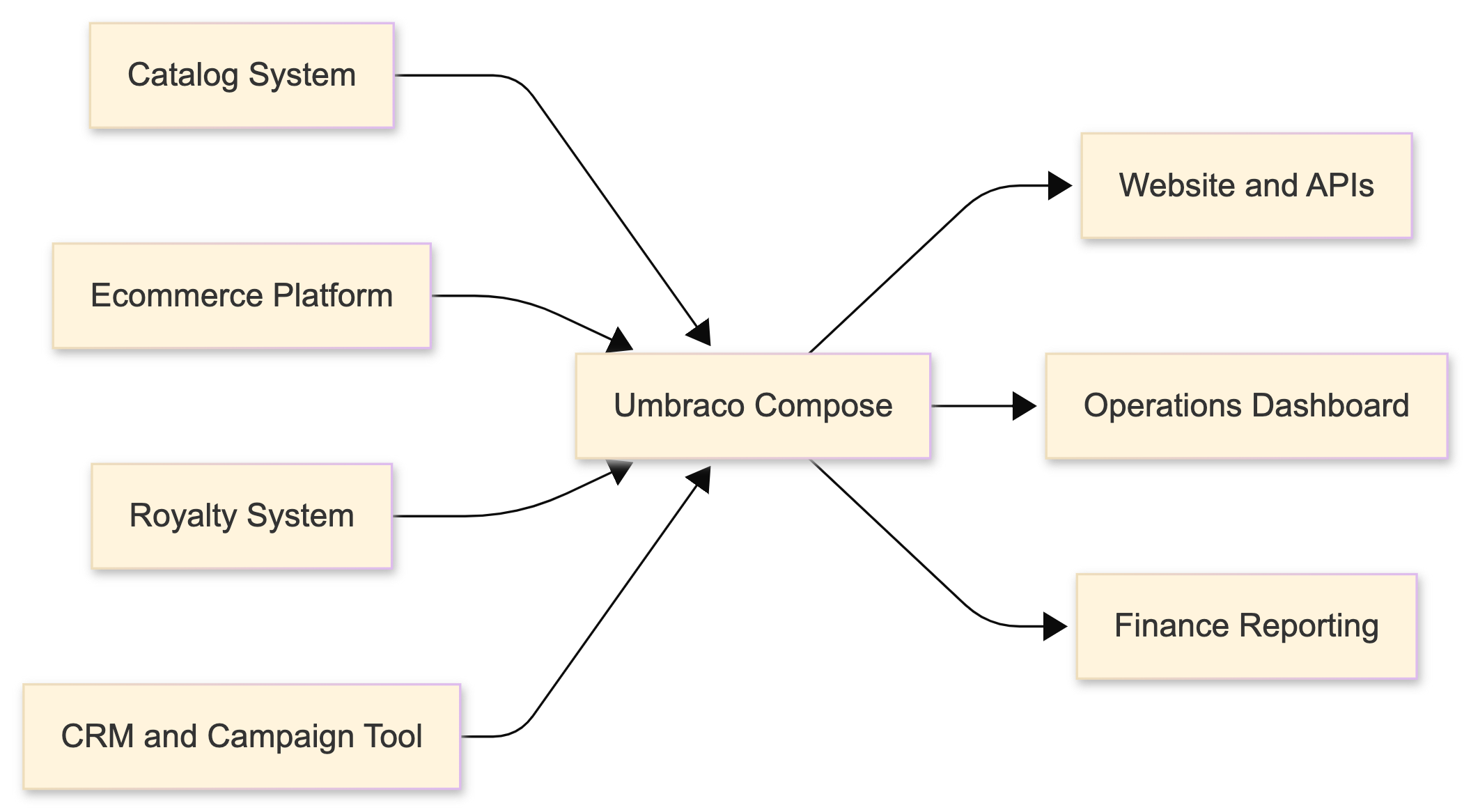
Key interfaces
Compose is, by and large, a headless platform. While the Umbraco Cloud Portal provides useful project management and diagnostics, the platform is primarily interacted with programmatically through three APIs:
- Management API for shaping the structure and behavior of a Compose project.
- Ingestion API for receiving record updates from external systems.
- GraphQL API for querying the data stored inside Compose.
That split is helpful to keep in mind while reading the rest of the article. In simple terms:
- You use the Management API to define what Compose should look like.
- You use the Ingestion API to send data into it.
- You use the GraphQL API to get useful answers back out.
A practical Compose architecture
Before we get into code, it helps to break Compose down into the parts a team would actually work with.
Project
Think of a Compose project as the top-level container for everything related to a solution. At Drop Table Records, the project might represent the organization's unified data layer for digital operations.
Inside that project sit one or more environments. Those environments are where the team actually defines the type schemas, collections, ingestion functions, persisted documents, and webhooks that shape how Compose behaves in practice. More on those in just a bit.
An environment gives the team a safe place to separate work in progress from production-facing behavior. You might have a development environment where the team experiments with schema changes, a staging environment for validating new ingestion logic, and a production environment serving live data to websites and internal dashboards.
That matters because Compose is not just a diagram on a whiteboard. It sits in the middle of important workflows, and teams need a safe way to evolve it.
Type Schema
The Type Schema is where the shared language of your data model starts to emerge.
For Drop Table Records, the team might define types such as:
- Artist
- Release
- Track
- Order
- RoyaltyStatement
- Campaign
Those types do not have to mirror a source system one-to-one. In fact, that is often the point. Compose gives you space to model the business concepts you actually want to query, instead of forcing every downstream consumer to understand the quirks of every upstream vendor.
Type schemas can do more than define a flat list of fields. They let you describe primitive properties and their types, model relationships between records that may originate in different systems, nest properties for richer structures, and compose larger schemas from smaller partial ones. That makes them one of the more powerful tools in Compose for turning disparate vendor payloads into a coherent model. I recommend taking a peek at the official documentation for Type Schemas to get an idea of everything you can do with them.
Collection
A collection is a logical grouping of related content within an environment. This is where normalized data lands after it has been ingested, but the way you group that data is a design decision rather than a hard rule.
Some teams may align collections to source systems. Others may get more value from organizing them around the way the business actually uses data. For Drop Table Records, collections for artists, releases, orders, royalty statements, and campaigns would probably make more sense than preserving every upstream vendor's terminology. Their catalog system may call an album an "asset bundle," while the ecommerce platform calls it a "product" and the royalty system calls it a "release unit." Compose gives the team a place to reconcile those differences into one useful concept like Release.
That choice matters because GraphQL requests target a single collection for the root content they return, even though queries can still traverse related objects referenced from those items. It is also worth remembering that, unless you filter deliberately, a query can return every item in the collection you are targeting.
Ingestion Function
An ingestion function is where inbound payloads are mapped into the shape Compose should store.
This is one of the most useful parts of the platform, because external systems rarely send exactly the data shape you wish they would. Some emit too much data, some emit too little, and many use naming conventions that only make sense if you live inside that system every day.
Instead of leaking that inconsistency into every consuming application, you normalize it at the boundary.
Compose does provide a default ingestion endpoint, but in practice I suspect many teams will end up using custom ingestion functions for each external source or domain. Most systems emit their own payload shape, and a source-specific function is often the cleanest place to validate, normalize, and enrich that data before it lands in a collection.
Persisted Document
A persisted document gives you a stable, reusable query surface. Rather than asking every consumer to construct raw GraphQL queries on the fly, teams can define specific documents for common needs and expose consistent shapes on purpose.
For Drop Table Records, that might mean one persisted document for artist pages, one for operations reporting, and one for finance dashboards. Each consumer gets a fit-for-purpose view without needing to know how the underlying records are connected.
Webhook
A webhook lets Compose participate in event-driven workflows in both directions.
Upstream systems can send record changes into Compose, and Compose can notify downstream systems when normalized records have changed. That makes Compose useful not only as a query layer, but also as a coordination point in a broader integration strategy.
How data flows through the Drop Table Records setup
Here is the simplified version of the data flow:
- A source system changes.
- That system sends a webhook payload into Compose.
- An ingestion function validates and reshapes the payload.
- Compose stores or updates the normalized record in the appropriate collection.
- Persisted documents make the resulting view queryable in a stable way.
- Optionally, Compose triggers downstream webhooks so other systems know that a useful synthesized record has changed.
The event flow for a single update might look like this:

A webhook payload example
For the purposes of keeping things at a reasonable depth here, we won't walk through every click required for setting up webhooks in external tools. What is more useful is the shape of the handoff itself.
Imagine the ecommerce platform sends a webhook whenever an order is created or updated:
{
  "event": "order.updated",
  "occurredAt": "2026-04-23T14:12:00Z",
  "source": "commerce-platform",
  "data": {
    "orderId": "ord_48291",
    "customerId": "fan_8842",
    "releaseId": "rel_midnight-query",
    "sku": "VINYL-LP-BLACK",
    "quantity": 2,
    "subtotal": 64.00,
    "currency": "USD",
    "status": "paid"
  }
}
That payload doesn't need to contain every possible field. In many cases, the minimum useful ingredients are:
- An event type
- A timestamp
- A source identifier
- A durable record identifier
- The fields Compose needs to update the relevant collection
If you are configuring a webhook in an external system, there are a few key things to remember:
- Trigger it on the business events that matter, such as order.updated, release.published, or royalty.statement.closed.
- Point it at the appropriate Compose ingestion endpoint for that origin.
- Include identifiers and business fields for Compose to either update the record directly or resolve it safely downstream.
The exact screens and settings will vary by vendor, but the pattern stays surprisingly consistent.
An ingestion function example
Once that payload arrives, an ingestion function can map it into the shape Drop Table Records actually wants to store:
export default function(payload) {
  const orders = Array.isArray(payload.data) ? payload.data : [payload.data];

  return orders.map((order) => ({
    action: "upsert",
    id: order.orderId,
    type: "order",
    data: {
      customerId: order.customerId,
      releaseId: order.releaseId,
      sku: order.sku,
      quantity: order.quantity,
      subtotal: order.subtotal,
      currency: order.currency,
      paymentStatus: order.status,
      updatedAt: payload.occurredAt
    }
  }));
}
This is intentionally lightweight, but it shows the core idea: the source system's payload shape is not the shape that every other consumer needs to live with forever.
That mapping layer is where teams can:
- Rename fields into a shared vocabulary
- Drop vendor-specific noise
- Enrich records with derived values
- Normalize relationships between systems
Three real-world views Compose can provide
This is where Compose gets interesting. Once Drop Table Records has normalized data flowing in, it can expose very different views without rebuilding the integration logic every time.
The public website needs an artist page that brings together:
- Core artist metadata from the catalog system
- Related releases and release dates
- Artwork references
- Current availability or preorder indicators from ecommerce
- Campaign highlights for current launches
That is not one system's native view. It is a synthesized view that Compose can assemble and expose cleanly.
The operations team wants to know which releases need attention in the next two weeks. Their dashboard may combine:
- Upcoming release dates
- Current preorder velocity
- Stock or availability indicators
- Campaign milestones
Again, Compose is useful here because the team is not querying four systems separately and then hand-stitching the answer together in the consuming app.
Finance does not necessarily need the same shape as the website or operations. They may want:
- Release identifiers and titles
- Sales totals for a given period
- Royalty statement windows
- Splits or payout-related metadata
The beauty of persisted documents is that each audience can have a stable query surface tailored to its job.
A persisted document example
Here is the kind of persisted document Drop Table Records might define for a website artist page:
query ArtistPage($slug: String!) {
  artist(where: { slug: $slug }) {
    items {
      name
      bio
      heroImage
      releases(orderBy: { releaseDate: DESC }) {
        title
        releaseDate
        artwork
        availability {
          preorderOpen
          format
        }
      }
      activeCampaigns {
        name
        startsAt
        channel
      }
    }
  }
}
The exact schema details may differ, of course, but the takeaway here is that downstream consumers get one dependable query for "artist page data" instead of needing to understand how catalog, commerce, and campaign systems are wired together behind the scenes.
Why persisted documents matter in practice
It is easy to think of persisted documents as merely a convenience feature, but in practice they are one of the things that makes a composed data layer feel production-ready.
They help teams:
- Standardize the queries consumers rely on
- Reduce accidental complexity in frontends and internal tools
- Improve maintainability when the underlying model evolves
- Put useful boundaries around what each consumer actually needs
For Drop Table Records, that means the website team can ask for "artist page data," operations can ask for "release readiness," and finance can ask for "sales plus royalty context," all without each team becoming an expert in every upstream system.
Where outbound webhooks fit
Once Compose has synthesized a useful record, it may be worth notifying other systems that something important changed.
For example:
- When a release record changes, Compose could notify the website cache layer to refresh.
- When a campaign-related record changes, Compose could notify an internal dashboard that launch readiness data should be re-pulled.
- When finance-facing release data changes, Compose could notify a reporting pipeline to rerun a lightweight sync.
That is a nice reminder that Compose is not just a passive bucket of data. In many architectures, it becomes an active participant in keeping distributed systems aligned.
Two helper tools that make Compose projects easier to work with
If you are experimenting with Compose and want something a little more ergonomic than driving everything through raw HTTP requests, I've built two helper tools that can smooth out the early stages. The API docs do give you a handy web-based client for one-off requests, but these helper tools are more useful when you want to understand the bigger picture or manage a project more intentionally.
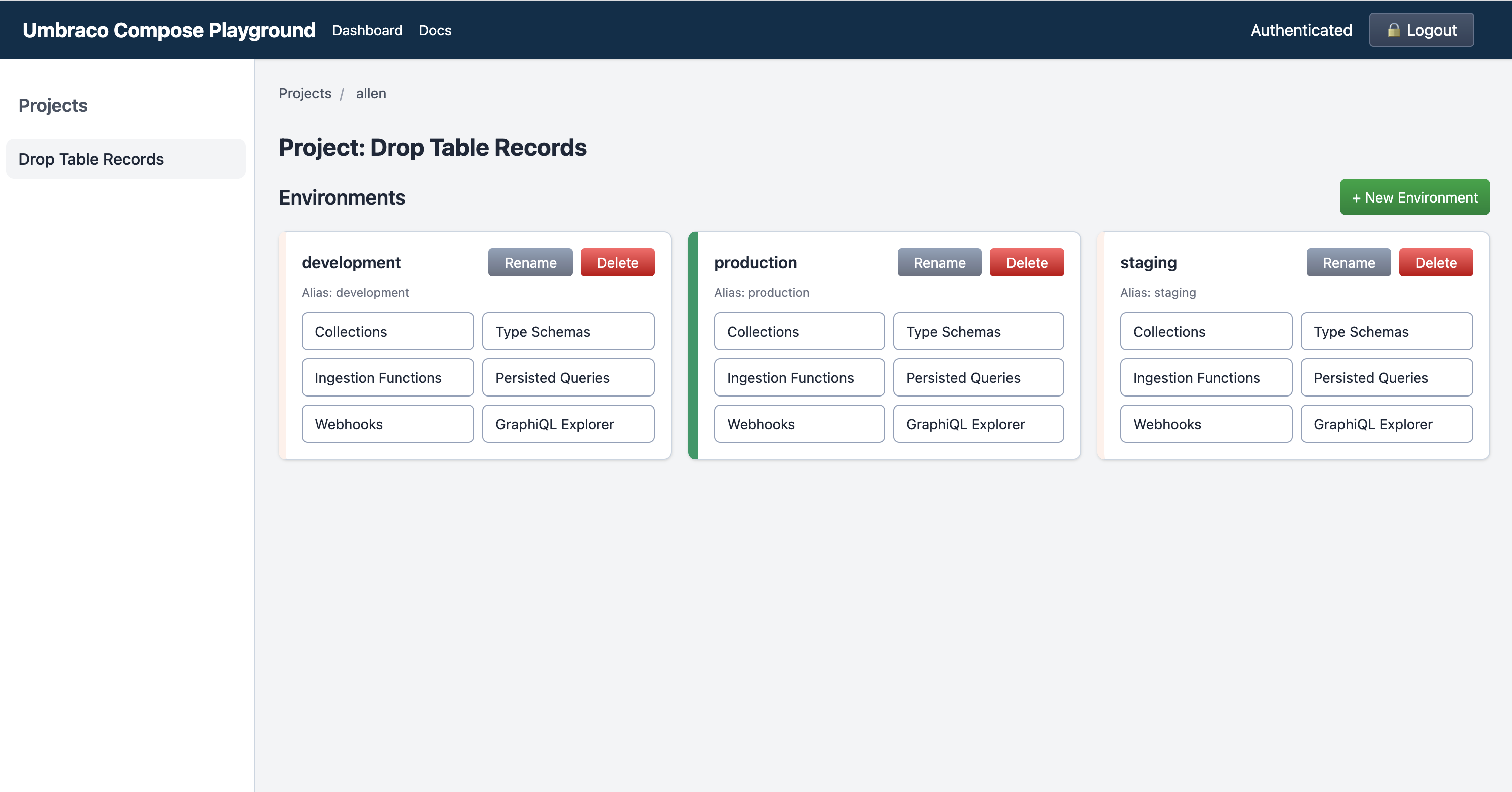
Umbraco Compose Playground
Umbraco Compose Playground is an Astro site that generates a CRUD-style interface for managing projects and setting up entities. I think of it as a practical exploration tool: it helps you see the shape of a Compose project more quickly and lowers the friction of trying ideas out.
That makes it especially useful when you are still learning the platform, validating a schema direction, or demoing concepts with a team that wants something more tactile than raw API calls.
umbraco-compose-cli
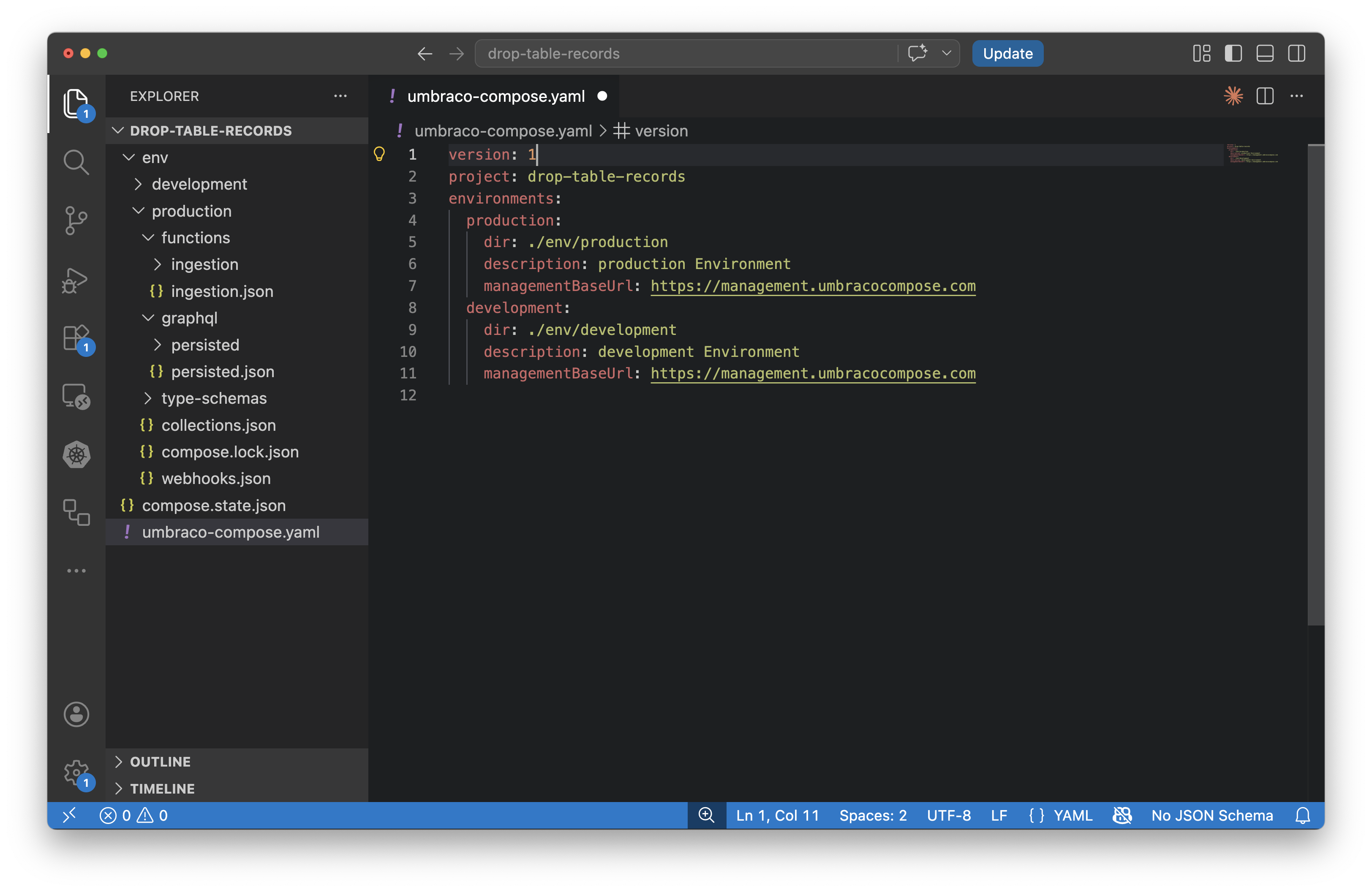
umbraco-compose-cli is an npm package for managing Compose projects in a more infrastructure-as-code style. Instead of treating the remote project as the only source of truth, you keep local files that represent your Compose state and sync them with the remote project you are targeting.
That approach is appealing if you want:
- Reviewable changes in version control
- Repeatable promotion across environments
- A more automation-friendly workflow for teams (think CI/CD for Compose management)
What this all looks like in the real world
The key thing I hope you take away from this exploration is that Compose is much more than yet another place to put your data. Its purpose and power become much clearer when you see it as a synthesis layer for questions your business already struggles to answer.
Drop Table Records is (mostly) fictional, but the shape of the problem is not. Plenty of organizations have some version of this story:
- One system knows the product
- Another knows the transaction
- Another knows the customer
- Another knows the reporting context
And somewhere, often inside a website, dashboard, or internal tool, a team is trying to pretend those records were born unified.
Compose gives you a more honest way to deal with that reality. It lets source systems remain source systems while creating a shared layer where records can be normalized, connected, queried, and reused with intention.
For teams building with Umbraco, that opens up some exciting possibilities. Not just because it is technically neat, but because it gives us a cleaner way to model how modern organizations actually work.