
I use Umbraco's Developer MCP Server extensively to create and edit content, but it does not extend to packages, including my own, UpDoc. So I built one.
What's UpDoc
I began a client project that required importing hundreds of pages of content from different sources such as PDFs, Web Pages, Word Documents and Markdown files into Umbraco.
I initially used the Umbraco MCP server and AI to transfer the content and whilst this worked well for the most part, fixing the bits where it didn't was more time-consuming than creating the pages manually by copy and pasting.
I needed a workflow that was reliable and repeatable, so I built UpDoc: an Umbraco extension that creates pages by mapping content from a source document to an Umbraco blueprint.
How I use AI to manage the process
When I first started using AI I relied on it to keep all of its planning in its own planning documents but found this unreliable and transient.
So I developed my own methodology and techniques where I "Document Everything Everywhere All At Once", a technique where documentation is written for both human users and AI agents.
I manage all of my issues in my GitHub project using GitHub templates containing all the steps required for different tasks such as creating pages.
AI Workflow
In Claude I have a skill that reads the project management system, my local hard drive and my GitHub project.
For the sake of this example let's call our Claude skill "new-page", although I have different skills for different document types.
Phase 1 - Uses Umbraco MCP
On invoking the "new-page" skill Claude does the following:
- Reads the tracker to pick the next page, including extracting information that will populate the GitHub issue
- Opens and populates a new GitHub issue from the template and creates a branch
- Checks the media library to see if the PDF already exists using the Umbraco MCP tool mcp__umbraco__get-collection-media or mcp__umbraco__get-media-children
- If it does not exist then fetches it from disk and uploads the PDF to the media library using another Umbraco MCP tool mcp__umbraco__create-media
Phase 2 - Uses Playwright
So now we come to the part that used UpDoc, and because I had no MCP server for my package I was using Playwright to drive the process with the following steps:
- Navigate to the parent node
- Click "Create from Source"
- Choose a document type
- Select a document blueprint
- Name the document
- Choose the source type
- Choose the PDF
- The extraction runs and generates the content in the content tab
- Click "Create"
- Read the new document ID out of the URL
These steps were documented in import-via-playwright.md stored in the Developer Documentation for easy configuration and maintenance.
Phase 3 - Uses Umbraco MCP
At this point the document has been created and we continued to do the rest of the work with the Umbraco MCP server including such things as:
- Walking every block on the new page against the source and checking what mapped and what didn't
- Fixing anything that didn't map
- Building an Image Rotator and choosing a thumbnail image from the image library
- Checking that all the links resolve
- Creating a member for the page enabling public access
- Running a pre-flight checklist
- Finally publishing the page
Kaizen - Always improving
So my AI workflow works but…
- Watching Playwright navigating its way through the tasks that I was previously doing manually was certainly satisfying but slow
- Every one of those dialogs is shadow DOM so page.evaluate with innerText returned nothing
- A recursive shadow-root walk returned nothing
- Even waiting for a button that is visibly on the screen timed out
Realising how much the Umbraco MCP server could do made me wonder whether UpDoc could have its own tools, so I messaged Phil Whittaker, Staff Engineer (AI) at Umbraco, and asked to discuss it on a call.
I asked Phil if it would be possible to create and add new tools that control UpDoc by extending the Umbraco MCP server.
Phil explained that I wouldn't need to add UpDoc's tools to Umbraco's MCP server at all and suggested I should have a read of the MCP Server SDK Documentation.
That way I could build my own Umbraco MCP server for UpDoc using the same techniques they used to build the CMS Editor MCP,, Forms MCP and Engage MCP including "Chaining", and give feedback on the documentation at the end of it.
Testing the CLI toolkit and Claude Code plugin
Reading the SDK it gave me a link in getting started to the CLI toolkit and Claude Code plugin which helps you Create Umbraco MCP Server.
So I opened my project UpDoc in Visual Studio Code which has Claude running as an extension and pointed it at that page and told it to set up the Umbraco MCP server.
I won't duplicate all of the steps that are already well described in the documentation.
Claude reported back that the installation was successful and that the MCP server was built and running. The toolkit came with its own example tools and needed credentials before it could do more. So I set up the environment variables from an Umbraco API user.
With the environment variables in place I ran the toolkit's init and generate steps which read the site's Swagger document and built a typed client from it. That client is what the tools would call.
init asks for a base URL and it means the host, not the Swagger URL. Giving it the full /swagger.json path just returns a 404.
I was very pleased that it worked first time and it generated a full client from Umbraco's own Management API. But there was nothing about UpDoc's in it at all!
So where was UpDoc?
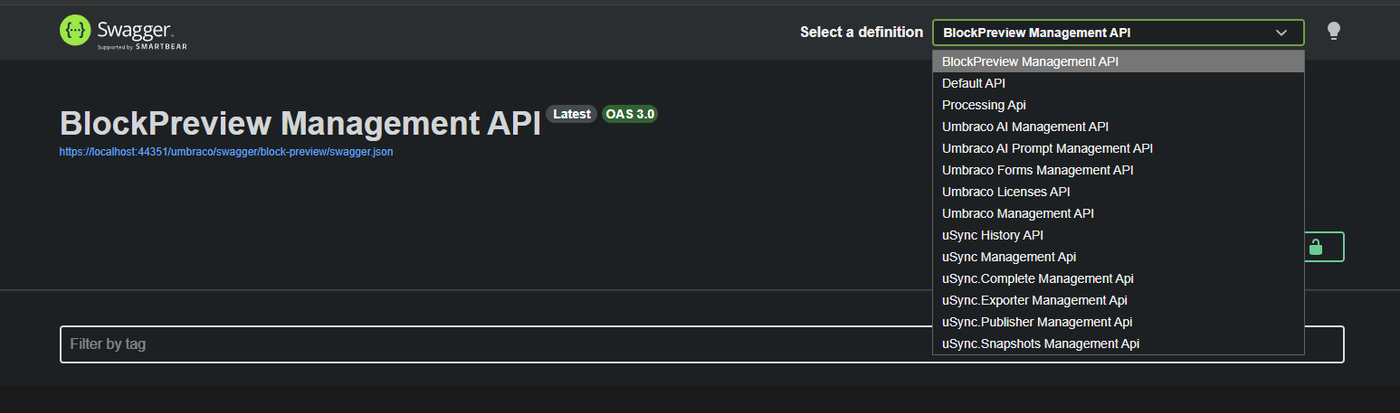
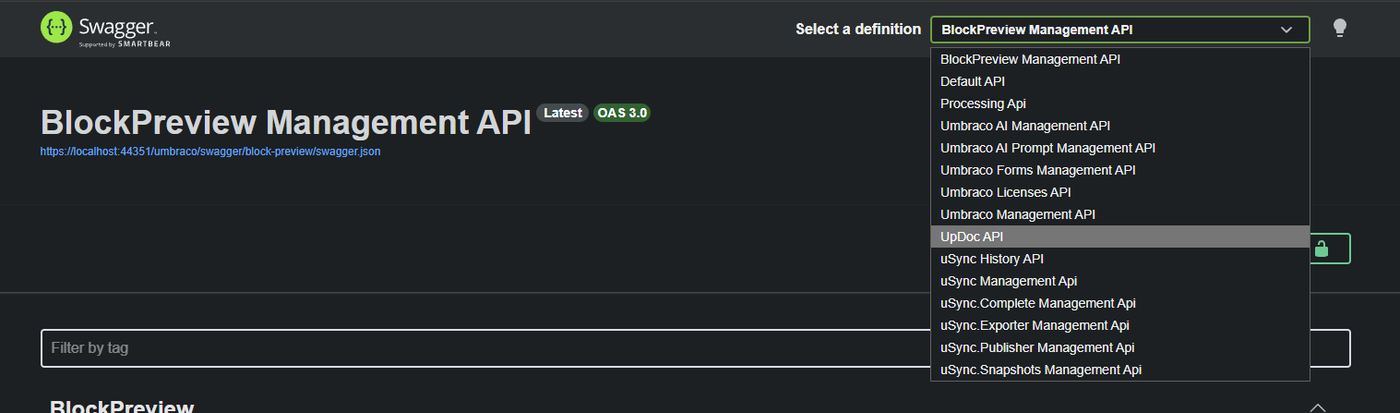
I asked Claude to look into this. The toolkit reads a site's Swagger document so the first question was whether UpDoc had one and it turned out it didn't!
All three of UpDoc's controllers declare [MapToApi("updoc")], which says "these endpoints belong to an API called UpDoc". But naming a document doesn't create one, and nothing ever had. So UpDoc's API had been running all along and the backoffice was calling it constantly. It was just invisible to anything that reads a spec.
All that was required to fix it was one configuration class registering the document the same way Umbraco registers its own separate APIs. Before the fix the URL returned a 404 but after it returned a 200 with all 35 routes described.
Building the first tool
Now that UpDoc's API was finally visible I re-ran the toolkit's generate step, and this time it built a client for UpDoc's own endpoints alongside Umbraco's. All of the 35 routes described in the Swagger document appeared in the generated TypeScript client.
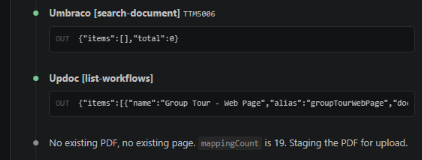
I was now able to build my first tool and decided on list-workflows because it answers the first question any session has: what can this site import and from what?
I watched Claude write a small TypeScript file that calls one function on the generated client and hands back what comes out.
The toolkit handles the authentication, the registration, and exposing the tool to whatever client is connected. Luckily this did not require any new code in UpDoc at all because the endpoint had been there all along answering the backoffice.
It worked! It came back with real workflows, their document types, blueprints, source types and mapping counts from my example UmBootstrap project.
Time for action
The list-workflows tool was read-only by design, so the next tool to choose was one that actually does something.
In fact there is only one tool that writes when using UpDoc and that is create-from-source.
So I instructed Claude to follow the same steps that we had used for list-workflows but it came back saying there was no endpoint to wrap for create-from-source.
Then it dawned on me… of course there wasn't. The steps required to create a document from source were performed by the end user in the Umbraco backoffice.
After discussing it with Claude there were a couple of options:
- Quick and cheap: the tool itself makes the individual calls. For example extracting the PDF, scaffolding from the blueprint, applying the mapping, saving, and then bundling all of that into a single tool written in TypeScript.
- Best practice: writing the logic in C# as an API endpoint and having the tool call it.
Option one puts the logic in the MCP server on my machine and only that tool can use it.
Option two however puts it in UpDoc on the Umbraco server. Then anything can use it e.g. the tool, a script, a scheduled job or the backoffice itself.
So I went with option two.
Giving UpDoc an API of its own
Claude ported the create logic from TypeScript to C# and put it behind a single endpoint, POST /updoc/create-from-source. Five IDs go in and structured JSON comes back, which means the work now lives inside UpDoc itself, versioned with the package and reachable by anything.
It is worth being clear about what that replaced. Choosing a document type (and by default the parent ID), picking a blueprint, finding the PDF, optionally adding a name: none of these steps do anything. They are the UI collecting five values, and only the final click does any work.
So the tool passes those five values straight to the endpoint:
parentId, documentTypeId, blueprintId, mediaId, documentName
The tool is small:
const createFromSourceTool = {
  name: "create-from-source",
  description:
    "Creates an Umbraco document from a PDF already in the media library, using an UpDoc workflow. " +
    "The document is created as a DRAFT and is not published.",
  inputSchema,
  outputSchema,
  handler: async (model) =>
    executeGetApiCall((client) =>
      client.postUmbracoManagementApiV1UpdocCreateFromSource({ ... })),
};
Playwright had to sit through the whole dialog because it was navigating a screen. The agent skips it because it's not navigating anything.
I tested the tool by pointing an agent at a PDF and asking for it to be converted to a page and it worked perfectly with every mapping resolved.
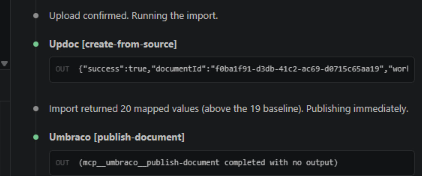
An agent stops when a tool reports success. For example, mine creates a draft and does not publish. Unless the description says so, you and the agent may both think the page is live when it isn't.
I suspect most Umbraco packages are in the same position as UpDoc was. A package generally exists to add something to the backoffice, so that is where the work goes, and anything the UI can do for itself stays in the UI. Which is fine for humans but not so much for automation.
Understanding what I'd built
After the conversation with Phil I assumed I would be setting up chaining. It turned out the MCP server project template had enabled chaining by default, pointed at Umbraco's server.
However this only became visible once I had registered UpDoc's server with a real MCP client rather than driving it from the CLI. The example tool that demonstrates chaining, get-chained-info, failed on its first ever call because it asks Umbraco's server for a tool that does not exist there. It had never been called.
It caused a few problems before it had done anything useful, so I turned it off in mcp-servers.ts leaving an environment variable to bring it back:
// Set UMBRACO_MCP_CHAIN=true to turn it back on.
...(process.env.UMBRACO_MCP_CHAIN === "true"
Nothing needed it. What I had built was a self-contained MCP server. It authenticates against the site itself, calls UpDoc's own endpoints, and knows nothing about Umbraco's server. The two meet in the agent session rather than in the code.
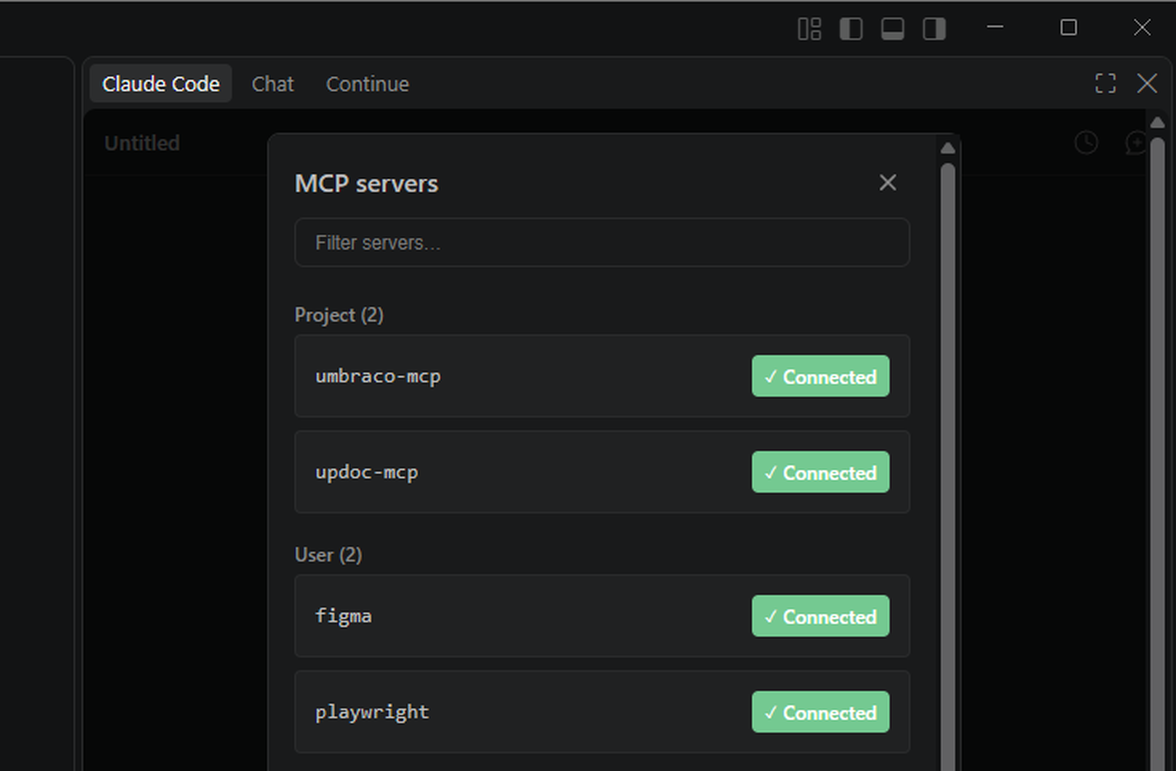
Going live
Next was the scary part, releasing this in the wild. I was experienced at publishing packages to NuGet but I had never published anything to npm in the past, in fact I didn't even have an account.
So I released the updated package to NuGet, reinstalled it and tested it successfully.
npm was the half I had never done. A version there is permanent, so before publishing I ran npm pack and installed it into an empty directory as a user would. That found five things reading the source never would have, including a dependency the SDK loads dynamically and a README still titled # mcp.
For anyone who wants to use it, there is nothing to install. They would create an API user in the Umbraco backoffice, and then add this to their client's MCP configuration:
{
  "mcpServers": {
    "updoc": {
      "command": "npx",
      "args": ["-y", "@umtemplates/updoc-mcp"],
      "env": {
        "UMBRACO_BASE_URL": "https://your-site.com",
        "UMBRACO_CLIENT_ID": "your-api-user-client-id",
        "UMBRACO_CLIENT_SECRET": "your-api-user-secret"
      }
    }
  }
}
After restarting the client the tools appear. npx fetches the MCP server and runs it on your own machine, next to your AI client, talking to your site over HTTPS. Nothing is added to your project except those few lines.
What I would tell another package author
Your Umbraco MCP server is the easy part. Mine is three tools, and the one that does the work is a name, a description, a schema and a single call. I'd recommend a tool should trigger an operation, not perform one.
Your first job should be to check whether your package has an API, because your aim is to expose its functionality to non-human users.
UpDoc is still a work in progress and by extension so is its MCP server. But it works and has made creating pages from a source document a single command to an agent.
Thanks to Phil Whittaker and the team at Umbraco HQ, creating this MCP server was both quick and easy.
So if your package does something an agent could usefully do, whether that is creating or editing content, or adding data, I hope this article has inspired you to take a look at the MCP Server SDK and give it a try yourself.