
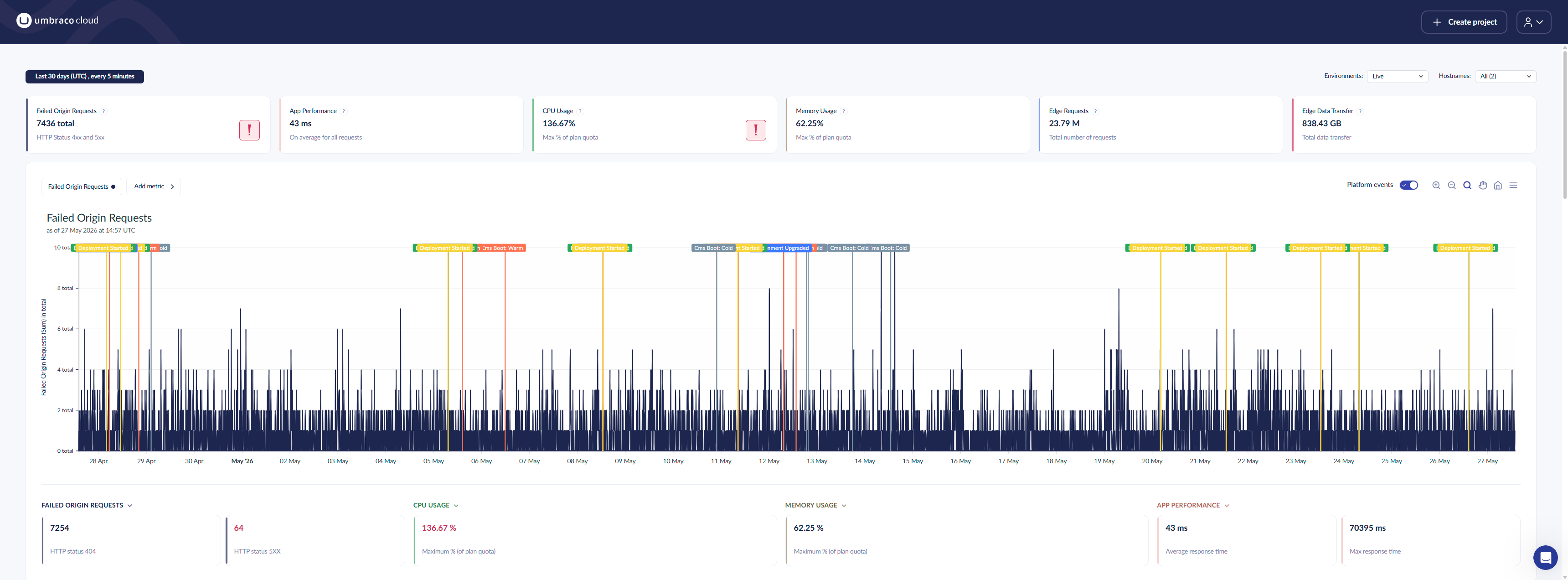
Back in April this year, the bandwidth usage on my Umbraco Cloud site, codeshare.co.uk, started climbing and it wouldn't stop. Umbraco let's me host the site on Umbraco Cloud for free as one of my MVP perks, so I was concerned about what would happen if it went over bandwidth limits. I watched it creep towards the cap day after day. My first thought was that being attacked by bots and when I checked with some of my friends online, they thought that too.
It kept getting worse no matter what I tried
I started with the obvious things. I added Brotli and Gzip compression, cached static assets more aggressively and optimised the hero images. Usage kept climbing.
Next I looked at who was actually requesting all these pages. I blocked the usual AI crawler user agents in robots.txt, GPTBot, ClaudeBot, Amazonbot, CCBot and a few others, turned on Cloudflare edge caching and pinned my canonical URLs. At the time my traffic logs showed AI crawlers accounting for something like 97% of my bandwidth, with a cache hit rate under 1%. Blocking them felt like it had to be the answer.
It was not. So I went further and added server-side bot mitigation too, a middleware that returned a 403 for known bad user agents plus rate limiting on top. Still climbing.
The middleware itself is simple, it just checks the incoming user agent against a configurable block list and returns a 403 if it matches:
public sealed class BotBlockingMiddleware
{
    private readonly RequestDelegate _next;
    private readonly string[] _blockedUserAgents;
    private readonly bool _enabled;

    public BotBlockingMiddleware(RequestDelegate next, IOptions<BotBlockingSettings> settings)
    {
        _next = next;
        _enabled = settings.Value.Enabled;
        _blockedUserAgents = settings.Value.BlockedUserAgents.ToArray();
    }

    public Task Invoke(HttpContext context)
    {
        if (_enabled)
        {
            string userAgent = context.Request.Headers.UserAgent.ToString();

            if (!string.IsNullOrEmpty(userAgent) &&
                _blockedUserAgents.Any(b => userAgent.Contains(b, StringComparison.OrdinalIgnoreCase)))
            {
                context.Response.StatusCode = StatusCodes.Status403Forbidden;
                return Task.CompletedTask;
            }
        }

        return _next(context);
    }
}
Both the block list and the rate limiter settings live in appsettings.json rather than being hard-coded, so I can tune them without a redeploy:
"BotBlocking": {
  "Enabled": true,
  "BlockedUserAgents": [
    "GPTBot",
    "ClaudeBot",
    "Claude-Web",
    "anthropic-ai",
    "CCBot",
    "Bytespider",
    "Amazonbot",
    "meta-externalagent",
    "meta-webindexer",
    "meta-externalfetcher",
    "FacebookBot",
    "Diffbot",
    "ImagesiftBot"
  ]
},
"RateLimiting": {
  "Enabled": true,
  "PermitLimit": 60,
  "WindowSeconds": 10,
  "SegmentsPerWindow": 5,
  "QueueLimit": 0,
  "RetryAfterSeconds": 10
}
Live-retrieval and citation agents such as ChatGPT-User and Perplexity-User, along with real search engines like Googlebot and Bingbot, are deliberately left off that block list. This was still the wrong layer to be fighting the problem in, but it is not doing any harm sitting there either.
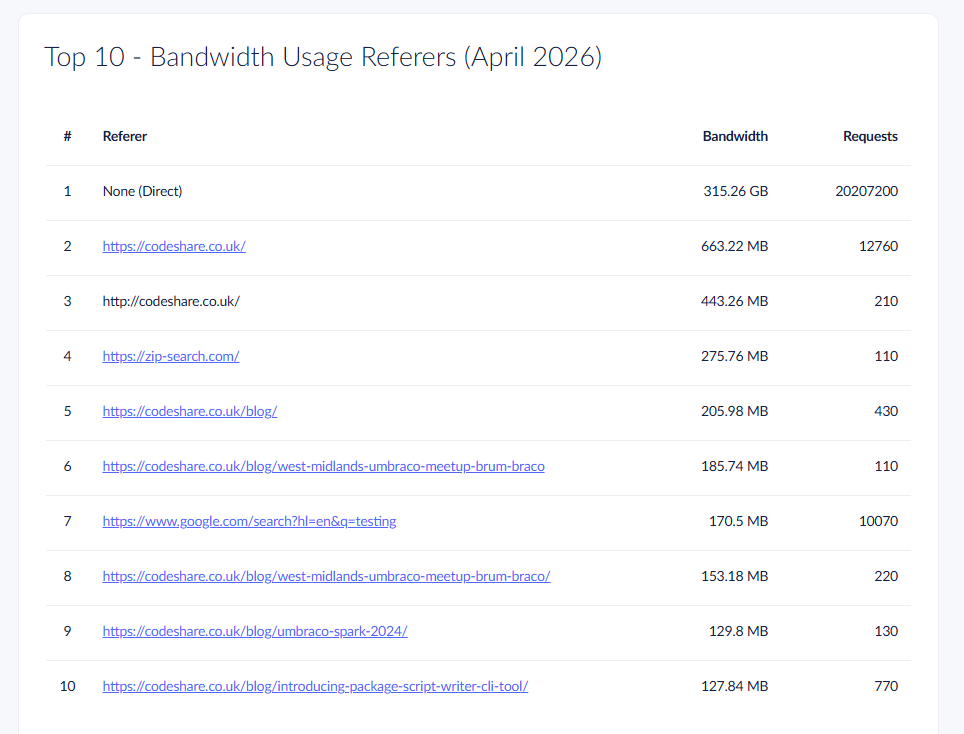
By this point I was really stuck, so I raised a support ticket with Umbraco Cloud and got talking to their AI support agent Umboto, who pointed me at a "Top 10 Bandwidth Usage Referrers" report that made the bot traffic obvious. Umboto's advice was sound as far as it went: turn on Cloudflare WAF, add a Managed Challenge, block Tor, tighten robots.txt. I turned WAF sensitivity up to High and blocked Tor traffic there and then. When I asked whether the Cloud team could just block the offending IPs on their end, the answer was polite but firm, that is on you, here is the same list of suggestions again. The conversation never escalated to an actual human, which felt oddly fitting for a post about mistaking legitimate traffic for an attack. Even Umbraco's own support bot could not tell me who was really behind it.
So I posted in the Umbraco MVP Slack channel too, to see if anyone else had run into the same thing. I am glad I did, because it turned out I was far from alone. Carl Sargunar said his team were having to add per-IP rate limiting rules to hold back the same kind of traffic. Jason suggested putting my own Cloudflare account in front of Umbraco Cloud, known as orange to orange or O2O, and shared a WAF rule he runs to block common scanning traffic before it even reaches the site:
(http.request.uri.path contains "/wp-admin") or
(http.request.uri.path contains "/wp-includes") or
(ends_with(http.request.uri.path, ".php")) or
(ends_with(http.request.uri.path, ".py")) or
(ends_with(http.request.uri.path, ".yml")) or
(ends_with(http.request.uri.path, "package.json")) or
(starts_with(http.request.uri.path, "/umbraco/delivery/"))
I already had my own Cloudflare account in front of the site, so I added rules along the same lines. Heather Floyd said the exact same thing had happened to her a few months earlier, and Carl mentioned his own team had seen their bill triple overnight from this kind of traffic. It was genuinely reassuring to hear it was not just me. Jason even floated the idea of the community putting together a proper guide to fighting bots, so nobody has to work all this out alone.
The moment it clicked
The thing that finally made me stop and think was that the crawlers doing all this damage were not shady scrapers. They were legitimate search engines, dutifully following every link on my site like they are supposed to.
I had just added a search feature to the blog, with category filters, sorting and pagination. It never once occurred to me that my own new feature was the culprit until I worked it out for myself, weeks later.
That is when it hit me. My new search page had category facets, a sort order and pagination, all controlled by query string parameters. Every combination of category, sort and page number is a different URL. Category plus sort plus page is not a handful of links, it is a combinatorial explosion of them. A crawler following links exactly as intended will happily walk into that and keep going, because as far as it knows every one of those URLs might lead somewhere new.
I had effectively built an infinite crawl space and handed every well-behaved bot on the internet a map to it.
The fix: nofollow on the facet links
The actual fix was small once I understood the problem. I added rel="nofollow" to the category filter links, the "clear search" link and the pagination links on the blog listing page, so crawlers stop treating every filter combination as a link worth following:
<nav class="nb-filter-list" aria-label="Filter by category">
    <a href="@Model.BlogUrl(clearCat: true)"
       data-filter="all"
       rel="nofollow"
       class="nb-filter-btn@(!hasCategory ? " active" : "")"
       aria-current="@(!hasCategory ? "true" : "false")">
        All Posts
    </a>
    @foreach (var facet in facets.Where(f => f.Count > 0 || f.IsSelected))
    {
        <a href="@Model.BlogUrl(toggleCat: facet.Alias)"
           data-filter="@facet.Alias"
           rel="nofollow"
           class="nb-filter-btn@(facet.IsSelected ? " active" : "")"
           aria-current="@(facet.IsSelected ? "true" : "false")">
            <svg class="nb-filter-ico" aria-hidden="true"><use href="#ico-cat-@facet.Alias" /></svg>
            @facet.Name
            <span class="nb-filter-count">@facet.Count</span>
        </a>
    }
</nav>
The pagination links got the same treatment:
@if (page > 1)
{
    <a href="@Model.PageUrl(page - 1)" rel="nofollow" class="nb-page-btn">« Previous page</a>
}
@foreach (var p in pages)
{
    <a href="@Model.PageUrl(p)" rel="nofollow" class="nb-page-btn">@p</a>
}
Alongside that, I set a noindex meta tag on the page whenever there is a query, category, sort or page in the URL:
@{
    // Filtered / searched / sorted / paginated variants are an infinite crawl
    // space. Keep them out of the index (canonical already points to the clean
    // /blog/ URL) while still letting crawlers follow through to the articles.
    if (Model.HasQuery || Model.HasCategory || Model.HasSort || Model.Page > 1)
    {
        ViewData["NoIndex"] = true;
    }
}
which the shared layout partial turns into the actual meta tag:
@if (ViewData["NoIndex"] is true)
{
    <meta name="robots" content="noindex,follow">
}
and I added the matching Disallow rules for those query parameters in robots.txt:
User-agent: *
Disallow: /*?q=
Disallow: /*?category=
Disallow: /*?sort=
Disallow: /*?page=
Allow: /
The idea is that crawlers can still reach every article through the clean, unfiltered XML sitemap, they just stop being funneled into every possible filter permutation. Nothing about real content became harder to find, I just stopped inviting bots down a rabbit hole I had built by accident.
I also went back to robots.txt and blocked the two crawlers that turned out to be the worst offenders outright:
User-agent: meta-webindexer
Disallow: /

User-agent: meta-externalfetcher
Disallow: /
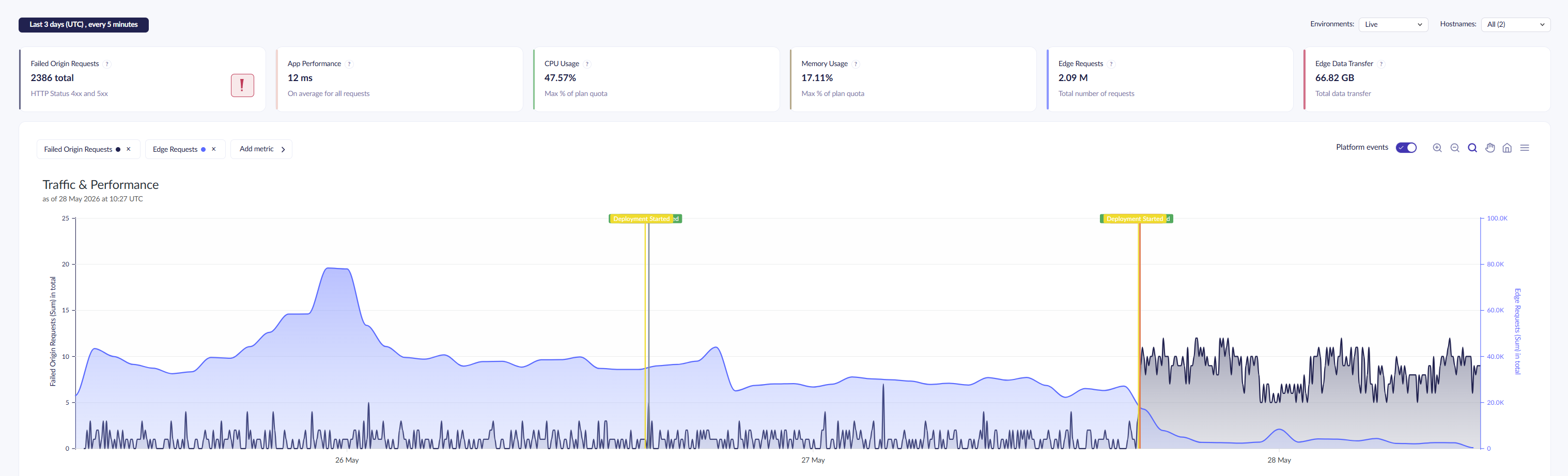
On top of that I turned on Cloudflare's bot-blocking protection for a bit of extra defence in depth. It is not the fix that actually solved the problem, that was the nofollow and noindex change, but it does not hurt to have it there. Within a day or two of all that going out, bandwidth dropped right back down to normal.
Key takeaway
If you are adding search, filtering or faceted navigation to an Umbraco site, think about the crawl surface you are creating before you ship it. Every filter, sort option and page of results is a real URL as far as a crawler is concerned, and those combine fast. Adding rel="nofollow" and noindex to filter and pagination links from day one costs you nothing and saves you a very confusing few weeks.
If you want to see how I built the search feature itself, I covered that in an earlier post on adding search and filtering with Umbraco Search. And if you ever find yourself in the same situation I was in, checking every bot-blocking option before your own links, it is worth asking early on whether the thing generating all those URLs is you.
I do want to say a genuine thank you to Umbraco Cloud all the same. Even though my ticket never got past Umboto and I went well over my bandwidth limit, they never charged me a penny for it.
Bot traffic eating into bandwidth is clearly not just my problem either, judging by how many people in the Umbraco community have their own war stories and their own WAF rules. If enough of us compare notes, a proper community guide to fighting bots feels like it would save everyone a lot of head scratching. If that sounds useful, get involved in the conversation over in the Umbraco Discord.